
Download Car Parking Multiplayer Old Versions for Android
Updating Car Parking Multiplayer to the latest version brings new features, but if you have an old device, you may face lag, high storage usage, and compatibility issues. So, switching back to an older version is the smartest choice, which can solve the problems you are facing without the need for a new device.
Car Parking Multiplayer Old Versions are not only lighter but also offer a more stable performance on low-end Android devices. Follow the guides below for downloading and installing the old versions, and say goodbye to the frustrating crashes.
Car Parking Older Versions
v4.8.16.7
v4.8.16.5
v4.8.13.6
v4.8.9.3.7
v4.8.6.9
v4.8.5.2
v4.8.4.2
v4.8.3.5
v4.2.3
v4.2.2
v4.1.4
v3.9.8
How to Install Car Parking Multiplayer Old Versions
Just follow the steps below to easily install the old versions of the game on your device.
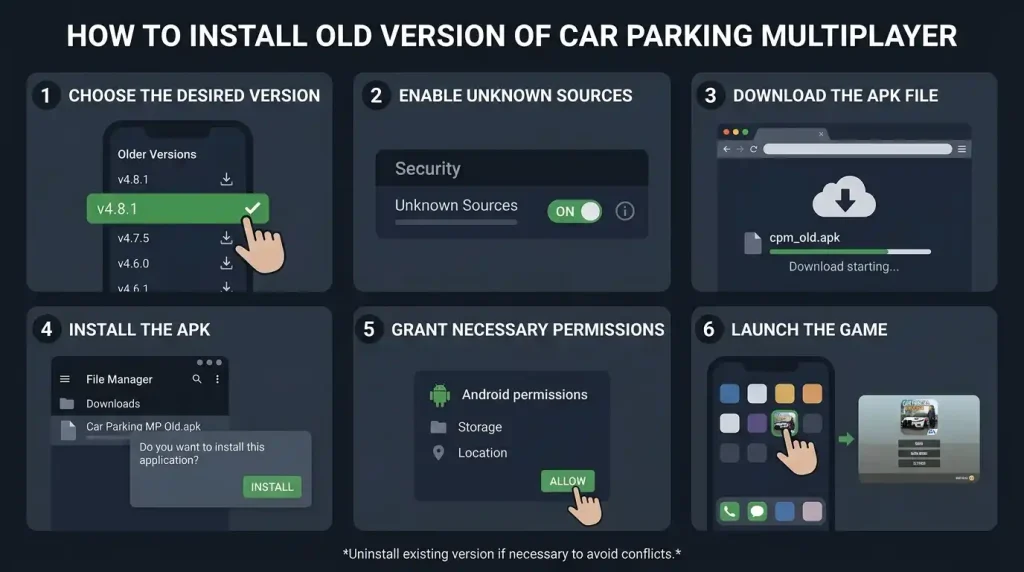
Step 1: Choose the Desired Version
First, select the version of Car Parking Multiplayer that you want to install. You can explore the list of older versions above.
Step 2: Enable Unknown Sources
Since you will be installing an APK file outside of the official app store, you need to enable installations from unknown sources on your device.
- Go to your device’s Settings> Security or Privacy
- Toggle the Unknown Sources option to allow installations from sources other than the Google Play Store
Step 3: Download the APK File
Now, download the car parking multiplayer old version file from the above list. Remember if you are downloading it from other sources, make sure that the site is trustworthy to avoid malware or corrupted files.
Step 4: Install the APK
After downloading, locate the APK file in your device’s file manager or downloads folder. Tap on the file to start the installation process. Follow the on-screen prompts to complete the installation.
Step 5: Grant Necessary Permissions
During the installation, your device may prompt you to allow certain permissions. Make sure you grant them so that the game can function properly. Once permissions are granted, the installation will proceed.
Step 6: Launch the Game
Now, you can find the Car Parking Multiplayer icon on your home screen or app drawer. Tap to launch the game and start playing the older Version.
Note:
If you’re switching from a new version, it’s recommended to uninstall the current version before installing the old version to avoid conflict or data loss.
Reasons for Downloading Old Versions
Compatibility Issues
Newer versions of car parking multiplayer often come with higher system requirements that are not supported by older devices. This includes both smartphones with outdated hardware and operating systems that can not handle the advanced features and graphics of the latest updates.
But Car Parking Multiplayer Old versions are typically designed to be compatible with a wide range of devices, including the one which has limited storage, RAM, and processing power. So players can switch to older versions and enjoy a smoother gaming experience with older devices.
Performance Issues
New Updates often come with enhanced graphics and additional features, which can cause performance issues on lower-end devices. These updates can cause significant slowdown, lag, and even crashes during gameplay, which result in a frustrating experience for players with limited system resources.
In contrast, cpm older versions are generally lighter with simple graphics and fewer resource-heavy features. These are optimized with lower hardware capabilities, and anyone can enjoy the game without upgrading their phones.
Missing Feature
In new versions, sometimes some cars, maps, or gameplay mechanics are removed or replaced with new ones. Players who preferred these older features often revert to a previous version to enjoy these features again. Also, some players who have been with the game for a long time may feel nostalgic about the older versions, which offered simpler but more enjoyable experiences.
Smaller File Size
Older versions of cpm normally have smaller file sizes as compared to the new ones. As updates add more features, the game’s size also increases, which can be a problem for users who have limited storage on their devices. Additionally, it can be downloaded faster because of its size as compared to the new releases.
Potential Drawbacks of Using Older Versions
Security Concerns
Older versions may not have the latest security updates, which can be a potential security risk. It is important to download it from trusted websites like us because downloading it from untrusted sources can contain the risk of malware or other malicious software included in the APK file.
Missing New Features
While the new features retain the nostalgic features, they also miss out on the latest cars, maps, and new features that are introduced in newer game releases. Players using the older versions will not be able to enjoy the fresh content and features that come with each update, such as new challenges, vehicles, and new events.
Lack of Official Support
Once a version becomes outdated, official support from the developers normally ends. This means that players using the older versions won’t receive bug fixes, performance improvements, or new updates to maintain compatibility with new operating systems or devices.
Questions Players Ask
Conclusion
While new versions of cpm bring new features and improvements, they may not always be the best fit for your device. If you are dealing with performance issues, storage limitations, or simply missing out on some of the older features, reverting to the car parking multiplayer old versions can be a good choice for you. And always remember to install the APK from trusted sources to ensure your device stays secure.
2 responses to “Download Car Parking Multiplayer Old Versions for Android”

Can I download car parking

Wow
Leave a Reply